In the previous post, we pulled the UAL for schen@meridianadvisory.com, ingested it into ADX, and oriented ourselves. The data showed a 2,733-event spike on November 19, three inbox rules created from an unfamiliar IP, and a two-day gap between the first rule and the mass phishing event. We knew what the threat actor (TA) did. We didn’t yet know when they got in or how.
The UAL records authentication as UserLoggedIn and UserLoginFailed operations, but those events don’t have all of the information. The Entra ID sign-in logs give you what the UAL doesn’t: device information, geolocation, conditional access evaluation, session identifiers, and authentication method detail as structured fields. For authentication events, the sign-in logs are the primary source.
We pulled the sign-in logs for Sarah Chen during data collection (covered in Post 1). The export contained 3,272 sign-in events spanning 12 through 22 November. For this post, we’re working from the 12-19 November incident-window subset: 2,992 events, 147 of which were interactive sign-ins. The TA’s initial sign-in was somewhere in those 147 interactive events.
What do the sign-in logs show?
We started with the interactive sign-ins grouped by IP and location. Non-interactive events (background token refreshes, service-to-service flows) generate volume but don’t represent someone sitting at a browser or a device prompt. The interactive events are where the TA’s entry will show up.
SignInLogs
| where isInteractive == true
| summarize
    Events = count(),
    FirstSeen = min(createdDateTime),
    LastSeen = max(createdDateTime)
    by ipAddress, tostring(location.city), tostring(location.state)
| order by FirstSeen asc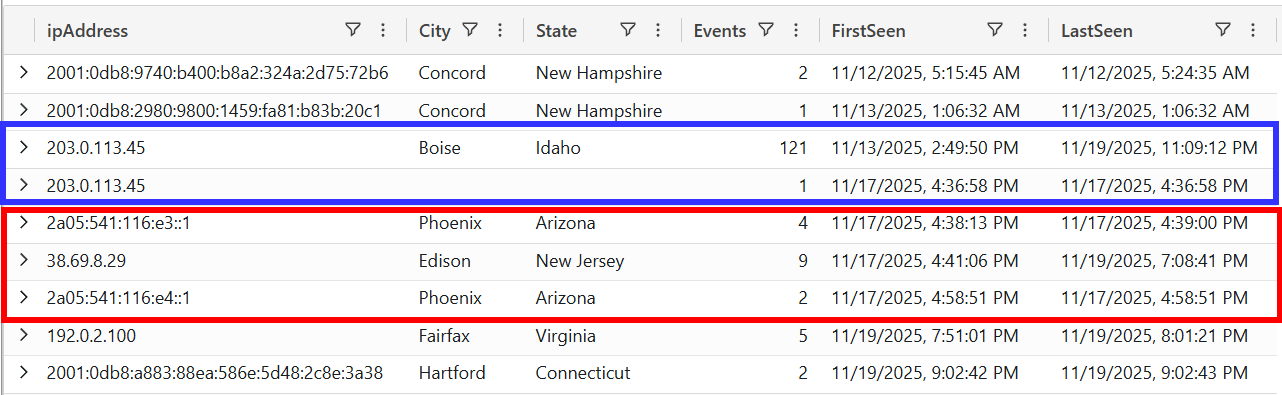
Figure 1 — Interactive sign-ins grouped by IP and location.
The sign-in logs showed something the UAL doesn’t record: geolocation. Sarah Chen’s successful interactive sign-ins all came from Boise, Idaho. Two IPs that appeared on 17 November resolved to Phoenix, Arizona and Edison, New Jersey. Neither location had appeared in Sarah Chen’s history.
But the IP summary alone wasn’t enough. The 122 interactive events from 203.0.113.45 included both successful browser sessions and failed token refreshes. We needed to look at the individual events.
The Entra ID sign-in logs store device detail, location, and authentication status as structured fields. Unlike the UAL, where you need mv-apply to extract user-agent and request type from nested arrays, the sign-in logs give you userAgent, deviceDetail, location, status, and sessionId as top-level fields:
SignInLogs
| where isInteractive == true
| project
    createdDateTime,
    ipAddress,
    userAgent,
    appDisplayName,
    status.errorCode,
    status.failureReason,
    deviceDetail.displayName,
    deviceDetail.browser,
    deviceDetail.operatingSystem,
    deviceDetail.isManaged,
    location.city,
    location.state,
    sessionId,
    conditionalAccessStatus
| order by createdDateTime asc
The output was 147 interactive events from 8 IPs. User-agents ranged from Chrome and Firefox to Windows-AzureAD-Authentication-Provider/1.0. Error codes included 0 (success), 50126 (invalid credentials), 50140 (KMSI interrupt), and 50014 (token validation). Some events came from IPv6 addresses across several locations in New Hampshire, Idaho, and the mid-Atlantic.
We could not separate the TA from Sarah Chen by looking at the raw output. We needed to eliminate what we could identify and then examine what remained.
What are all the failed logins?
The first pattern we noticed: 42 interactive sign-in failures with the user-agent Windows-AzureAD-Authentication-Provider/1.0 and error 50126, spanning 12-17 November. Every one came from Sarah Chen’s own IPs in Boise, from her managed workstation PROBOOK-PC3 (isManaged: true, trustType: Hybrid Azure AD joined).
These were not a password spray. Windows-AzureAD-Authentication-Provider/1.0 is the authentication library Windows uses for background token refresh. Error 50126 from a managed device on the user’s own IP means a cached credential is failing to refresh, not an external attacker guessing passwords. Entra logged them as interactive because the device prompted for credentials, but this is normal behavior in enterprise environments when a password changes and a device still holds the old credential.
Filtering these out removed 42 of the 56 interactive sign-in failures.
What does normal look like for this user?
Before we could identify the TA, we needed to define what normal looked like for this user. We filtered to before the first suspicious event on 17 November and profiled Sarah Chen’s interactive sign-in pattern.
SignInLogs
| where isInteractive == true
| where createdDateTime < datetime(2025-11-17T16:38)
| where status.errorCode == 0
| summarize
    Count = count(),
    FirstSeen = min(createdDateTime),
    LastSeen = max(createdDateTime)
    by ipAddress, Browser = tostring(deviceDetail.browser), City = tostring(location.city), State = tostring(location.state)
| order by Count desc
Figure 2 — Sarah Chen’s interactive sign-in baseline before the compromise.
One IP, one browser, one location. All 22 of Sarah Chen’s successful interactive sign-ins before the compromise came from Chrome 142 at 203.0.113.45 in Boise, Idaho. Her Outlook desktop and mobile clients authenticate through non-interactive token flows that don’t appear in the interactive sign-in data.
The sign-in logs also showed what the non-interactive baseline looked like. Sarah Chen’s PROBOOK-PC3 generated hundreds of non-interactive events daily across Microsoft Office, Teams, OneDrive Sync, and Outlook Mobile. All from her known IPs: 203.0.113.45 in Boise, 2001:0db8:* IPv6 range in Concord, and 198.51.100.22 in Burlington, VT.
To build a complete device profile, we also checked the UAL’s Exchange-level events (MailItemsAccessed, Send) which record the ClientInfoString for every mailbox operation:
| Source | Location | ClientInfoString |
|---|---|---|
| Outlook desktop | Boise, ID | Client=MSExchangeRPC |
| Outlook desktop | Burlington, VT | Client=MSExchangeRPC |
| Outlook iOS | Concord, NH | Client=OutlookService;Outlook-iOS/2.0 |
| Browser OWA | Boise, ID | Client=OWA;..Chrome/142.. |
The pattern was consistent. All user-agents were real browser or application identifiers. All IPs resolved to known locations. This gave us a baseline to compare against.
What doesn’t belong?
With the stale token failures filtered out and the baseline established, we looked for interactive sign-ins that matched neither. We queried for user-agents that were not Chrome, not the Windows authentication provider, and not from Sarah Chen’s known locations.
SignInLogs
| where isInteractive == true
| where userAgent !has "Chrome"
    and userAgent !has "Windows-AzureAD-Authentication-Provider"
| project
    createdDateTime,
    ipAddress,
    userAgent,
    City = tostring(location.city),
    State = tostring(location.state),
    sessionId
| order by createdDateTime asc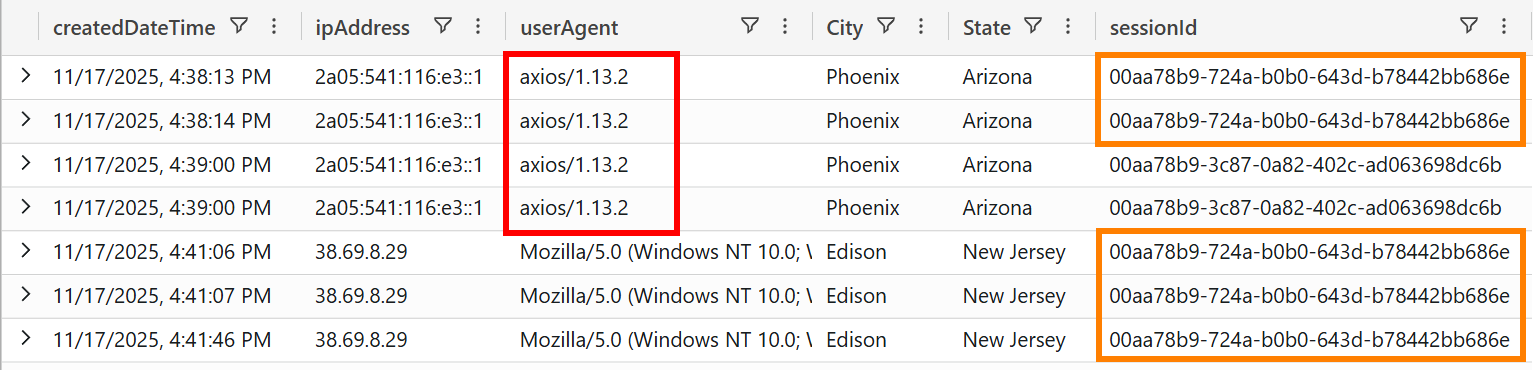
Figure 3 — Interactive sign-ins after filtering out Chrome and Windows-AzureAD.
Two patterns appeared that matched neither the baseline nor the stale token noise.
At 4:38:13 PM on 17 November, an interactive sign-in appeared from IPv6 address 2a05:541:116:e3::1 in Phoenix, Arizona. The user-agent was axios/1.13.2. The deviceDetail was empty: no device name, no OS, no browser, not managed. Three minutes later at 4:41 PM, a separate IP (38.69.8.29) in Edison, New Jersey appeared with Firefox 143.0 on Windows 10.
The sign-in logs also captured a detail the UAL doesn’t: both the axios events and the Firefox events shared the same sessionId (00aa78b9-724a-b0b0-643d-b78442bb686e). Two different IPs, 1,800 miles apart, using the same session. The AiTM relay established the session from Phoenix, and the TA’s browser in Edison picked it up three minutes later.
axios is a JavaScript HTTP client library used in Node.js applications to make programmatic HTTP requests. It does not appear in normal browser login flows, Outlook desktop authentication, or mobile app sign-ins. When axios appears as the user-agent on a Microsoft sign-in event, something is making programmatic requests to the Azure AD authentication endpoint. AiTM phishing toolkits like EvilProxy and Evilginx2 use HTTP libraries like axios to relay stolen credentials to Microsoft’s login endpoint in real time.
axios/1.11.0 has been documented as a user-agent indicator in M365 BEC cases. The version here was 1.13.2, but the fingerprint is the same: a programmatic HTTP client appearing in an interactive sign-in flow.
We checked the Entra ID sign-in logs for the entire Meridian Advisory Group tenant to see how common axios was as a login user-agent. Across all users and all sign-ins in the investigation window, axios/1.13.2 appeared only on Sarah Chen’s account, only from IPv6 addresses in the 2a05:541:116::/48 range, and only during the compromise window. No other user in the organization had a single sign-in event with an axios user-agent.
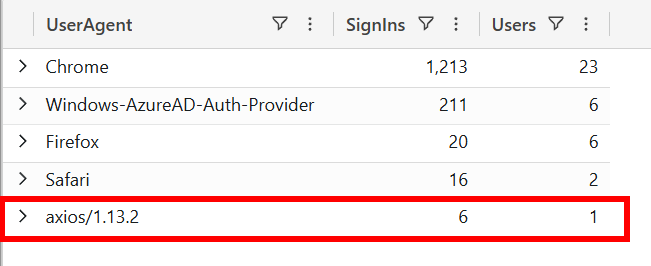
Figure 4 — Tenant-wide user-agent prevalence from Entra ID sign-in logs.
Neither the 2a05:541:116::/48 range nor 38.69.8.29 appeared in Sarah Chen’s baseline. Both appeared for the first time on 17 November. The axios user-agent had never appeared anywhere in the tenant. And the geolocation confirmed what the IPs suggested: the TA’s infrastructure was in Phoenix and Edison, not Boise or Concord.
Set up a detection rule for sign-in events where the user-agent is an HTTP client library (axios, python-requests, httpx, Go-http-client). These do not appear in legitimate browser, Outlook, or mobile authentication flows. In this case, axios/1.13.2 was the only sign-in event across the entire tenant that used a programmatic HTTP client, and it was the AiTM relay. The first axios event was at 16:38:13. The TA opened the mailbox at 16:42:02. A user-agent watchlist rule on the sign-in logs would have fired three minutes before the TA touched the mailbox.
How did the AiTM credential relay work?
An Adversary-in-the-Middle phishing attack places a reverse proxy between the user and the real authentication endpoint. The user receives a phishing email with a link to the proxy, which presents Microsoft’s real login page. The user enters their credentials and completes MFA normally. On the other side, the proxy forwards everything to Microsoft and captures the resulting session token. The sign-in logs told us the AiTM relay happened at 4:38 PM on 17 November. We hadn’t yet identified the specific phishing email that started it.
The proxy captured the post-MFA session token because Sarah completed the full authentication flow on the TA’s behalf. Traditional MFA (push notifications, SMS, TOTP) does not protect against AiTM. Only phishing-resistant methods like FIDO2 security keys or Windows Hello for Business prevent the proxy from capturing the session.
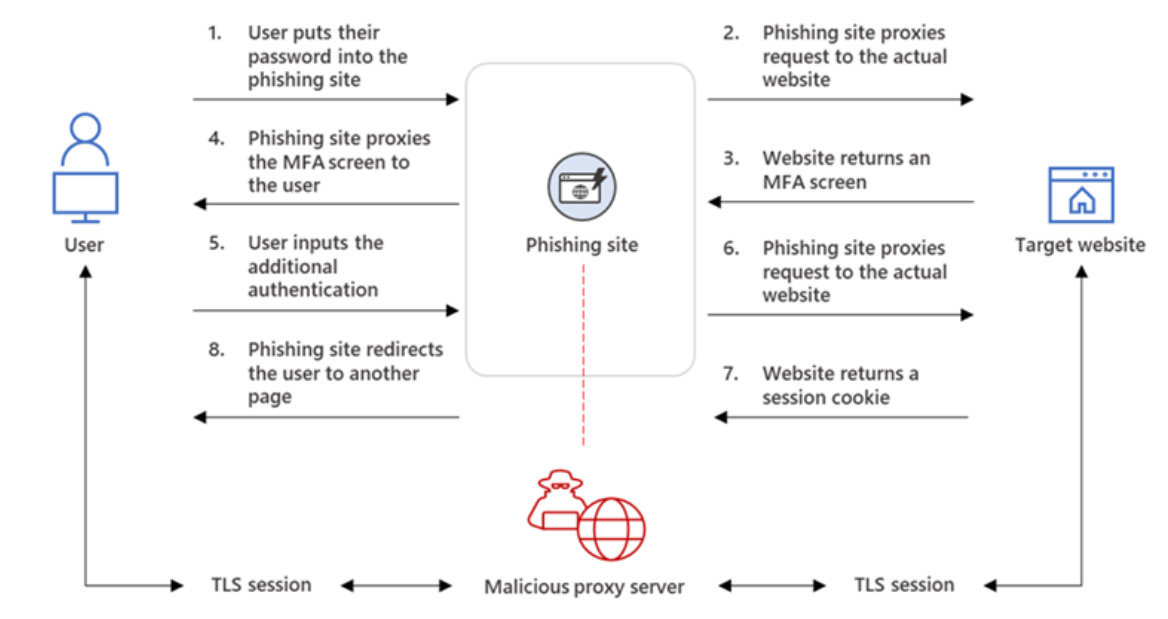
Figure 5 — AiTM phishing attack flow. Source: Microsoft Security Blog.
The six axios events visible in Figure 3 appeared in two clusters.
First cluster (4:38-4:39 PM):
At 4:38:13 PM, the first sign-in from 2a05:541:116:e3::1. Error 50140 with the failureReason “Keep me signed in interrupt” indicates the KMSI prompt was presented. At 4:38:14 PM, a second event from the same IP with error 0, confirming the session was established. The sessionId 00aa78b9-724a-b0b0-643d-b78442bb686e linked both events to the same authentication flow. At 4:39:00 PM, a second pair with a different sessionId (00aa78b9-3c87-0a82-402c-ad063698dc6b).
Second cluster (4:58 PM):
At 4:58:51 PM, a third pair from a different IPv6 address in the same /48 block (2a05:541:116:e4::1). This was either a token refresh or a second authenticated session established by the toolkit.
The sign-in logs captured one detail that matters: conditionalAccessStatus: success on every AiTM event means whatever conditional access policies were in place evaluated and passed. The stolen session satisfied the tenant’s access requirements.
Conditional Access passed because the token was legitimate. The AiTM proxy forwarded Sarah Chen’s real credentials and real MFA response to Microsoft’s login endpoint. From Entra’s perspective, MFA was satisfied. The resulting session token inherited the MFA claim, and CA evaluated it and found it valid.
The deviceDetail on every axios event was empty: no deviceId, no displayName, no OS, isManaged: false. Compare this to Sarah Chen’s stale token events, which reported PROBOOK-PC3 with isManaged: true and Hybrid Azure AD joined. An empty device profile on an interactive OfficeHome sign-in is a documented BEC indicator. Combined with the axios user-agent, these events carried two independent detection signals on the same sign-in.
Where did the TA go after the relay?
At 4:42:02 PM, one minute after the first browser sign-in from 38.69.8.29, the first MailItemsAccessed event appeared in the UAL. The TA had opened the mailbox via OWA. The sign-in logs identified two IPs with two roles: 2a05:541:116::/48 ran the credential relay, 38.69.8.29 was the TA’s operational browser.
The UAL’s MailItemsAccessed events confirmed the split:
UAL
| where operation == "MailItemsAccessed"
| extend ClientIPAddress = tostring(auditData.ClientIPAddress)
| extend ClientInfoString = tostring(auditData.ClientInfoString)
| summarize EventCount = count() by ClientIPAddress, ClientInfoString
// Filter to IPs identified during authentication analysis
| where ClientIPAddress in ("203.0.113.45", "38.69.8.29", "198.51.100.22")
| order by EventCount desc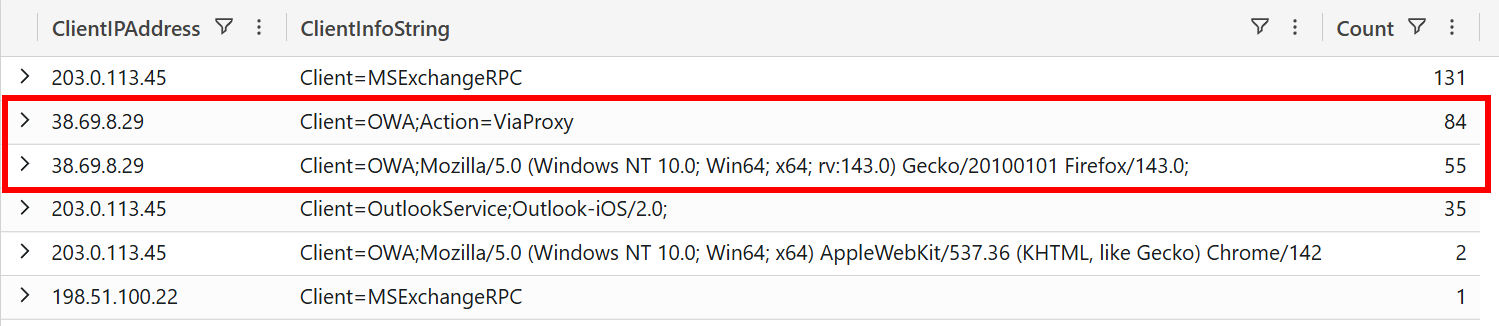
Figure 6 — MailItemsAccessed events by IP and ClientInfoString.
We identified the TA’s ClientInfoString from 38.69.8.29: Client=OWA;Action=ViaProxy. During the compromise window, the ViaProxy string appeared only on events from this IP. Sarah Chen’s legitimate OWA sessions showed Client=OWA;Mozilla/5.0 (Windows NT 10.0; Win64; x64) AppleWebKit/537.36 (KHTML, like Gecko) Chrome/142.0.0.0 Safari/537.36 from IP 203.0.113.45.
| Sarah Chen | AiTM relay | TA browser | |
|---|---|---|---|
| IP | 203.0.113.45 | 2a05:541:116::/48 | 38.69.8.29 |
| Location | Boise, ID | Phoenix, AZ | Edison, NJ |
| User-Agent | Chrome 142 | axios/1.13.2 | Firefox 143.0 |
| Device | PROBOOK-PC3 (managed) | Empty (unmanaged) | Empty (unmanaged) |
What we knew at this point
After working through the sign-in logs, we had a complete set of identifiers for the TA:
- AiTM relay infrastructure: IPv6 addresses in
2a05:541:116::/48(Phoenix, AZ), user-agentaxios/1.13.2 - Initial credential relay: 17 November 2025 at 4:38:13 PM (UTC)
- Operational IP: 38.69.8.29 (Edison, NJ), first interactive session at 4:41:06 PM
- Browser: Firefox 143.0 on Windows 10, unmanaged device
- Session:
00aa78b9-724a-b0b0-643d-b78442bb686e - OWA signature:
Client=OWA;Action=ViaProxy - Session terminated: 19 November at 7:08 PM (token revoked)
- Total access window: approximately 50.5 hours
The 50.5-hour window reflects the token’s natural lifetime, not repeated authentication. M365 refresh tokens are valid for 90 days. OWA sessions time out after 6 hours of inactivity but renew automatically via the refresh token. The TA authenticated once through the AiTM relay and never needed to authenticate again.
With these identifiers, we could filter the entire UAL to isolate TA activity from Sarah Chen’s legitimate usage. Every event from 38.69.8.29, every event with Client=OWA;Action=ViaProxy belonged to the TA. The IPv6 relay infrastructure was limited to the initial authentication and did not reappear in mailbox operations.
axios/1.13.2 from 2a05:541:116::/48 (Phoenix, AZ)38.69.8.29 (Edison, NJ — Firefox 143.0)38.69.8.29 (Client=OWA;Action=ViaProxy)38.69.8.2938.69.8.2938.69.8.29We now had the entry point and the TA’s fingerprint. One minute after the first mailbox access, the TA created an inbox rule. Over the next two days, they searched for wire transfer details, exfiltrated a real financial document, and attempted a payment diversion.
The next post covers what the TA did with those 50.5 hours of access.